
Make SIS Is Back: Turn mShell Scripts into Symbian Apps
If you ever wrote a script in mShell, you probably remember the final step: upload the compiled .mex to airbit's Make SIS page and get back a standalone .sis that anyone could install, without needing mShell on their phone.
That service went offline years ago, and with it the only way to turn an m script into a real app. So I rebuilt it. The new generator takes the same input files as the original and makes packages for every platform mShell ran on, from the Nokia N70 to the Sony Ericsson P1i.
How It Works
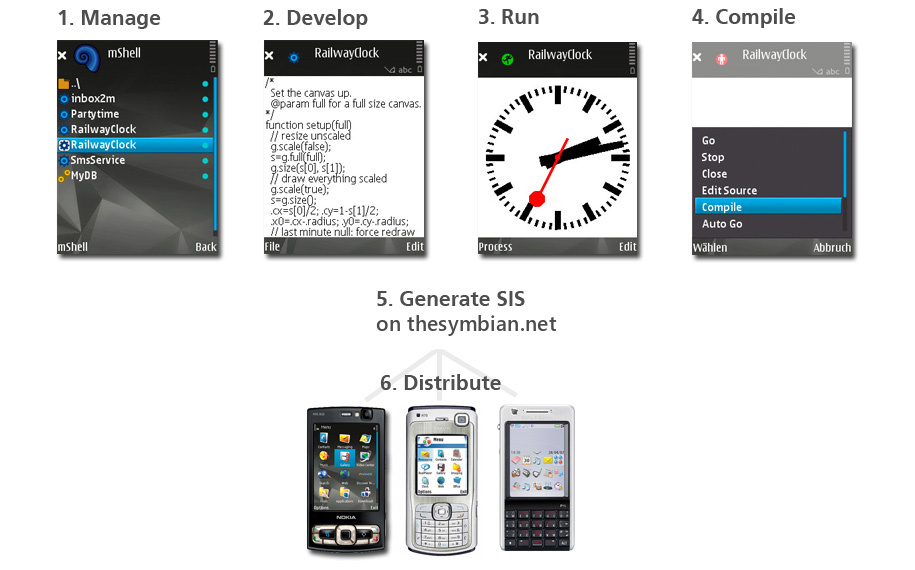
Write and test your script in mShell on the phone.
Open the script's menu and choose Compile. mShell saves a
.mexfile next to your source.Copy the
.mexto your computer, open the SIS generator, choose your phone's platform and press Make SIS.Send the
.sisto any phone of that platform and install it like any other app ✨
Make Your SIS
The generator has its own page here on TheSymbian.net. Add your .mex, pick a platform, and your .sis is ready to download a few seconds later.
Good to Know
Platforms: S60 2nd, 3rd and 5th Edition, plus UIQ 2 and UIQ 3. Packages have been tested on real phones for all of them except S60 5th Edition, which is brand new, so treat it as a beta for now.
Signing: Symbian 9 phones (S60 3rd and 5th Edition, UIQ 3) only install signed packages, so the generator self-signs them for you. If your phone complains about the certificate, download the CA certificate offered next to your package and add it in the phone's Certificate manager.
The m runtime is included in every package by default and only installs if the phone doesn't have it yet.
Privacy: your files are only used to build the package, and the finished
.sisis deleted from the server after an hour.
Note: Need the details of an input file or setting? Hover the i markers in the generator, or read airbit's original mShell reference.



